Introduction
I’ve been doing a lot of research on AI agents recently, exploring different frameworks, architectures, and models. The speed of innovation is incredible, especially the recently released Large Language Models (LLMs) Claude Opus 4.6 and Claude Sonnet 4.6, and OpenAI’s GPT 5.3 Codex. What I’ve found is that it really helps to try different models and see which one fits your use case best. For example, Claude Opus 4.6 and GPT 5.3 Codex really take the time to understand the codebase before making changes when you use them in agent mode, they analyze the full context, read related files, and plan their edits rather than jumping straight to code generation. However, one good thing I find very helpful is to make multiple iterations with different models and compare the results side by side to see which one is better for your specific use case. This also gives you more insight into how different models approach the same problem, which can be very valuable when you’re building for example an AI agent. It’s also a learning process.
With all that exploration in mind, I decided to build something practical: an AI agent that is specialized in Microsoft Learn content. Why? Because in my daily work I often need quick, reliable answers from official Microsoft documentation. The idea is simple, give the agent access to official Microsoft documentation via the Model Context Protocol (MCP), and have it refuse questions that aren’t related to Microsoft technologies. This keeps the agent focused and reliable.
I built the agent using the GitHub Copilot SDK and C# (.NET 10), exposed it as an OpenAI-compatible API, and connected Open WebUI as the chat frontend. Everything runs in Docker containers, making the whole setup reproducible with a single docker compose up.
The full source code is available on GitHub: arashjalalat/ai-agent-copilot-sdk
Why GitHub Copilot SDK?
The GitHub Copilot SDK (part of the Microsoft Agent Framework) gives you a clean, C#-native way to build agents that are backed by the full power of GitHub Copilot’s model infrastructure. Some key advantages:
- No API key management for models: you authenticate with a GitHub token, and the SDK handles model access
- Built-in MCP support: connect any MCP server (like Microsoft Learn) with a few lines of configuration
- Session management: maintain conversation context across multiple requests
- Streaming support: real-time token-by-token responses via Server-Sent Events
The architecture
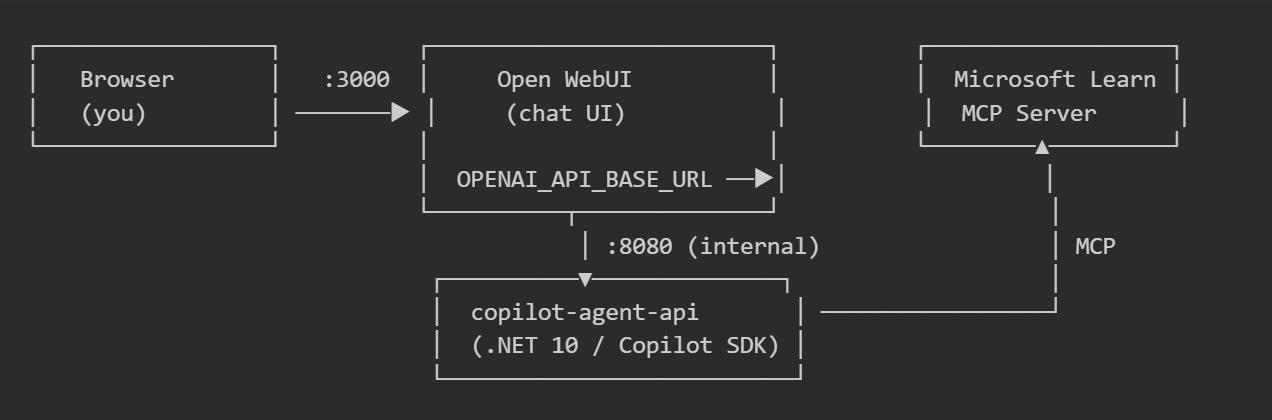
- Copilot Agent API: a .NET 10 minimal API that wraps the GitHub Copilot SDK and exposes OpenAI-compatible endpoints (
/v1/chat/completions,/v1/models, etc.) - Open WebUI: an open-source chat UI that connects to any OpenAI-compatible API. It discovers the agent’s model via
/v1/modelsand sends chat requests just like it would to OpenAI or Ollama. - Microsoft Learn MCP Server: the official Microsoft Learn MCP endpoint at
https://learn.microsoft.com/api/mcp, which gives the agent the ability to search and retrieve documentation.
Building the agent
The core: CopilotAgentGateway
The agent lives in a single service class that initializes the GitHub Copilot client and configures it with a system prompt and MCP server:
public sealed class CopilotAgentGateway : IAsyncDisposable
{
    private readonly CopilotClient _copilotClient;
    private readonly GitHubCopilotAgent _agent;
    private readonly ConcurrentDictionary<string, AgentSession> _sessions = new();

    public CopilotAgentGateway(IConfiguration config)
    {
        _copilotClient = new CopilotClient();

        var sessionConfig = new SessionConfig
        {
            McpServers = BuildMcpServers(config),
            Model = _modelId,
            SystemMessage = new SystemMessageConfig
            {
                Content = "You are a Microsoft Learn-grounded assistant. " +
                          "If the user asks a question that is unrelated to " +
                          "Microsoft technologies or Microsoft Learn content, " +
                          "politely state that you can only help with " +
                          "Microsoft-related topics and stop the conversation! ..."
            }
        };

        _agent = new GitHubCopilotAgent(
            _copilotClient,
            sessionConfig: sessionConfig,
            name: "copilot-agent",
            description: "OpenAI-compatible wrapper around GitHub Copilot Agent Framework");
    }
}
A few things to note:
- The system prompt instructs the agent to only answer Microsoft-related questions. If the user asks about cooking recipes or holiday destinations, the agent will politely refuse.
- The MCP servers dictionary wires up the Microsoft Learn endpoint, so the agent can search and retrieve documentation autonomously during a conversation.
- Sessions are tracked in a
ConcurrentDictionary, allowing multiple concurrent conversations with full context retention.
Connecting Microsoft Learn via MCP
The MCP connection is configured in just a few lines:
private static Dictionary<string, object> BuildMcpServers(IConfiguration config)
{
    var url = config["MSLEARN_MCP_SERVER_URL"]
              ?? "https://learn.microsoft.com/api/mcp";
    var label = config["MSLEARN_MCP_SERVER_LABEL"]
                ?? "microsoft-learn";

    return new Dictionary<string, object>
    {
        [label] = new McpRemoteServerConfig
        {
            Type = "http",
            Url = url,
            Tools = ["*"],  // expose all available tools
        },
    };
}
By setting Tools = ["*"], all tools exposed by the Microsoft Learn MCP server become available to the agent. This includes documentation search, code sample lookup, and page fetching capabilities.
OpenAI-compatible endpoints
To make the agent work with any OpenAI-compatible client (including Open WebUI), the API exposes standard endpoints using .NET minimal APIs:
app.MapGet("/v1/models", (CopilotAgentGateway svc) =>
    Results.Json(new
    {
        @object = "list",
        data = new[] { new { id = svc.ModelId, @object = "model", owned_by = "copilot" } },
    }));

app.MapPost("/v1/chat/completions", HandleChatCompletionsAsync);
app.MapPost("/v1/responses", HandleResponsesAsync);
The /v1/chat/completions endpoint supports both streaming (SSE) and non-streaming responses, session management via session_id, and full conversation history forwarding.
Streaming implementation
The streaming implementation uses IAsyncEnumerable to yield tokens as they arrive from the Copilot SDK:
public async IAsyncEnumerable<string> RunStreamingAsync(
    string prompt, string sessionId,
    [EnumeratorCancellation] CancellationToken cancellationToken = default)
{
    var session = await GetOrCreateSessionAsync(sessionId, cancellationToken);
    var emitted = string.Empty;

    await foreach (var update in _agent.RunStreamingAsync(
        prompt, session, options: null, cancellationToken))
    {
        if (string.IsNullOrEmpty(update.Text)) continue;

        var current = update.Text;
        if (current.StartsWith(emitted, StringComparison.Ordinal))
        {
            var delta = current[emitted.Length..];
            if (!string.IsNullOrEmpty(delta))
            {
                emitted = current;
                yield return delta;
            }
        }
    }
}
This handles the incremental text accumulation pattern that the Copilot SDK uses, extracting only the new delta text for each SSE event.
The agent in action
Asking about Azure Functions
When the user asks a Microsoft-related question, the agent uses the Microsoft Learn MCP tools to search documentation and provide a grounded, accurate answer:
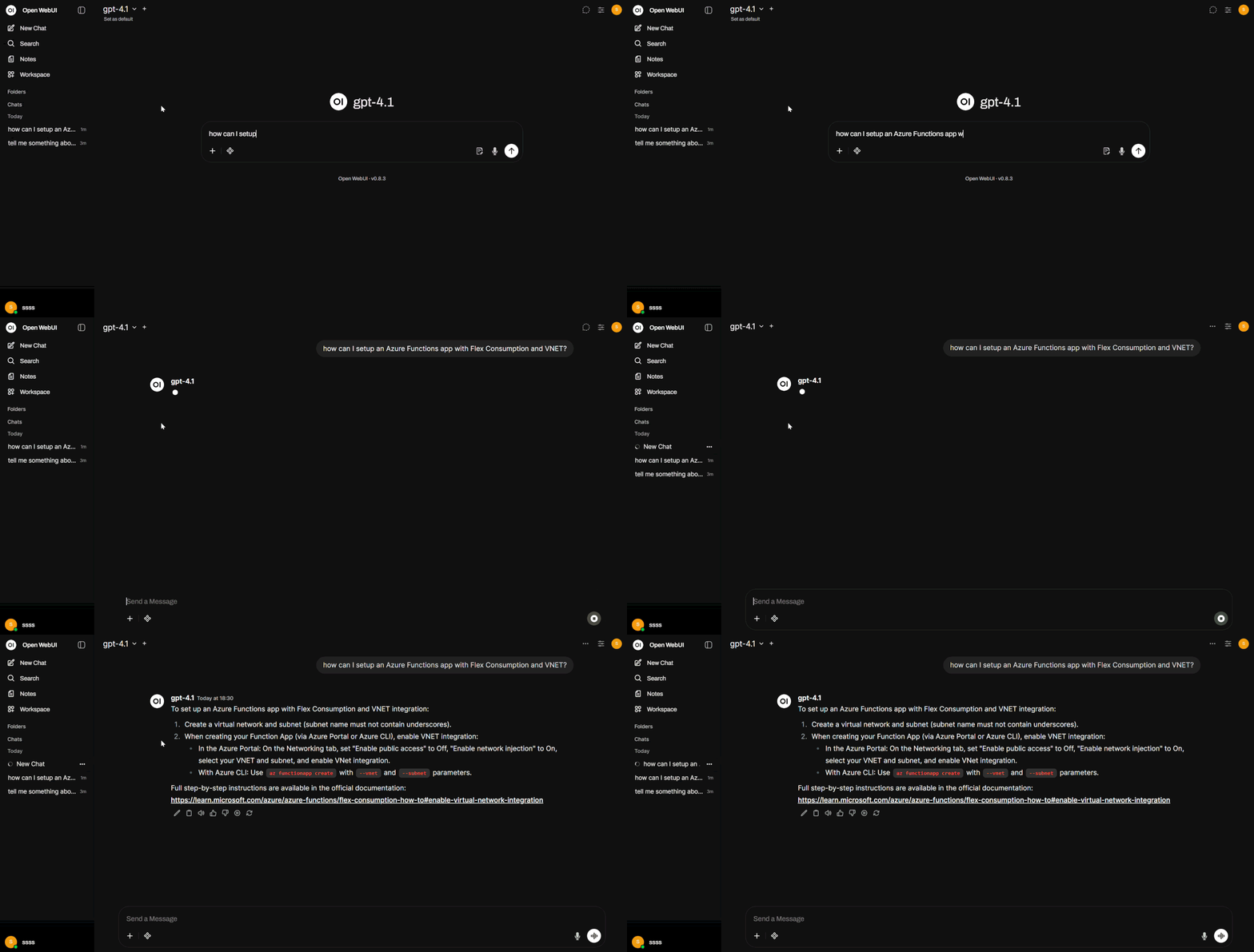
The agent retrieves relevant documentation from Microsoft Learn and comes up with a helpful response.
Follow-up questions
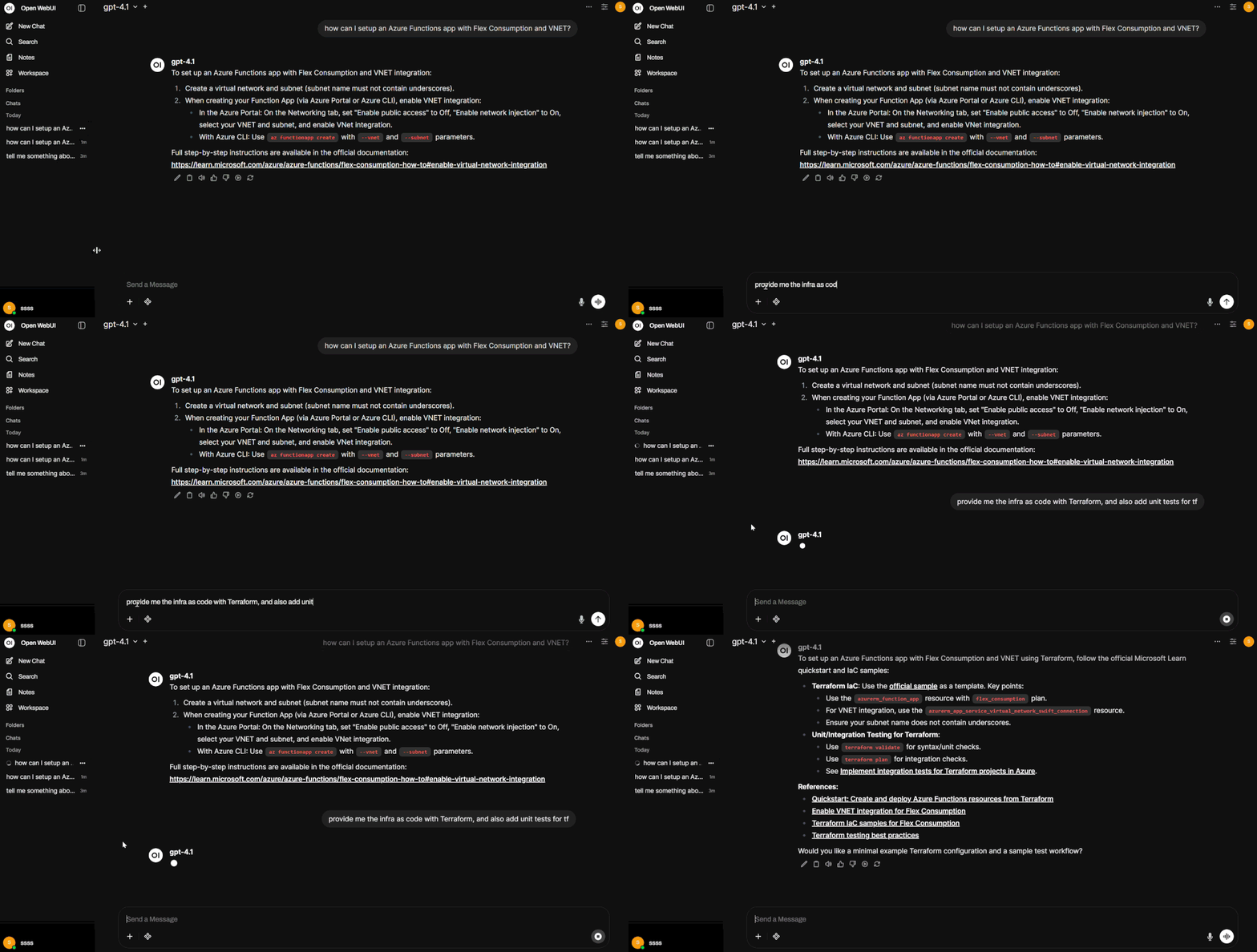
Because the agent maintains session context, follow-up questions work naturally:
Handling images
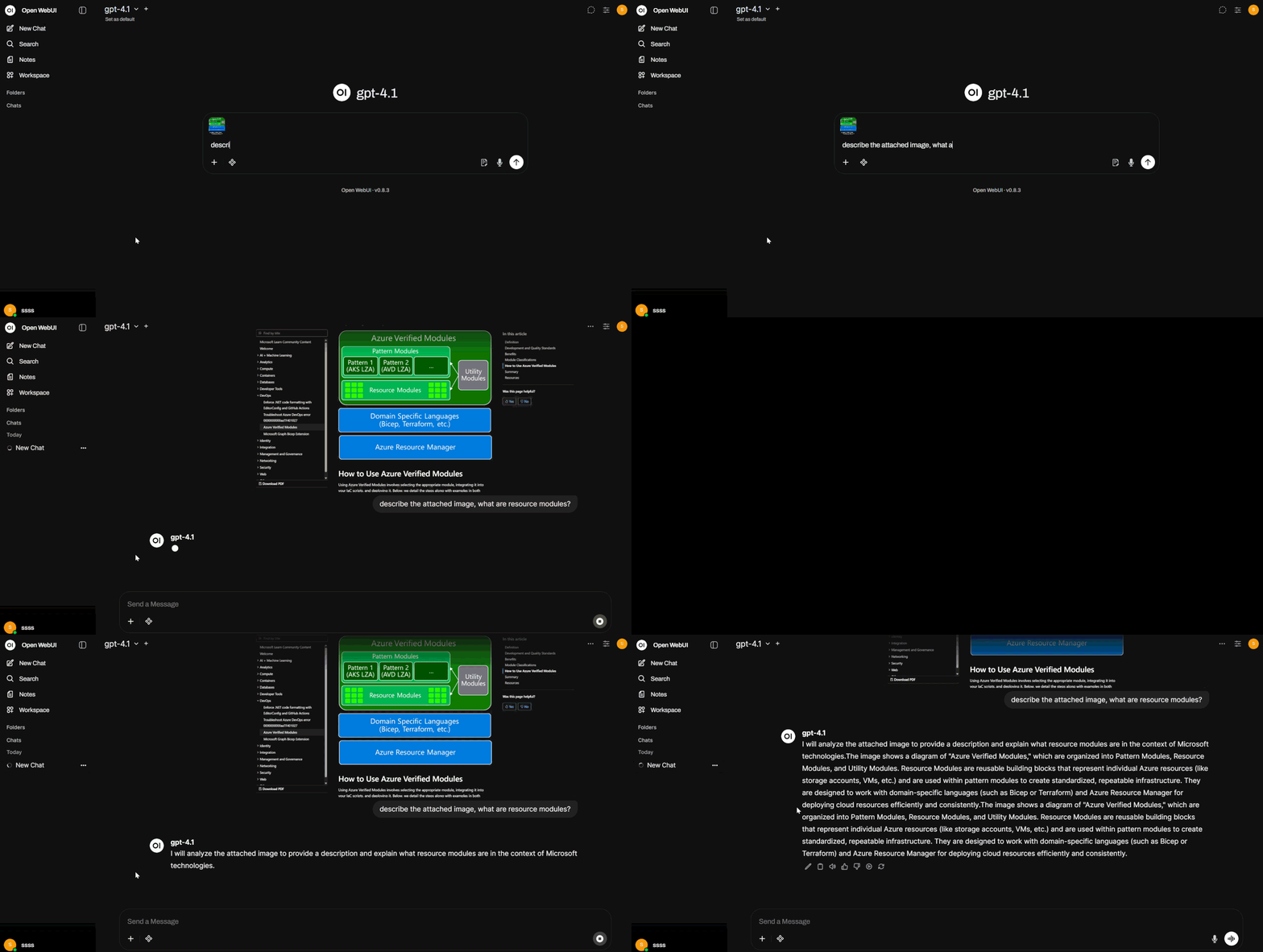
The agent can also process attached images. When a user uploads a screenshot or diagram that appears to be Microsoft-related, it will analyze the content and answer:
Refusing unrelated questions
If the user asks something unrelated to Microsoft technologies, the agent politely declines:
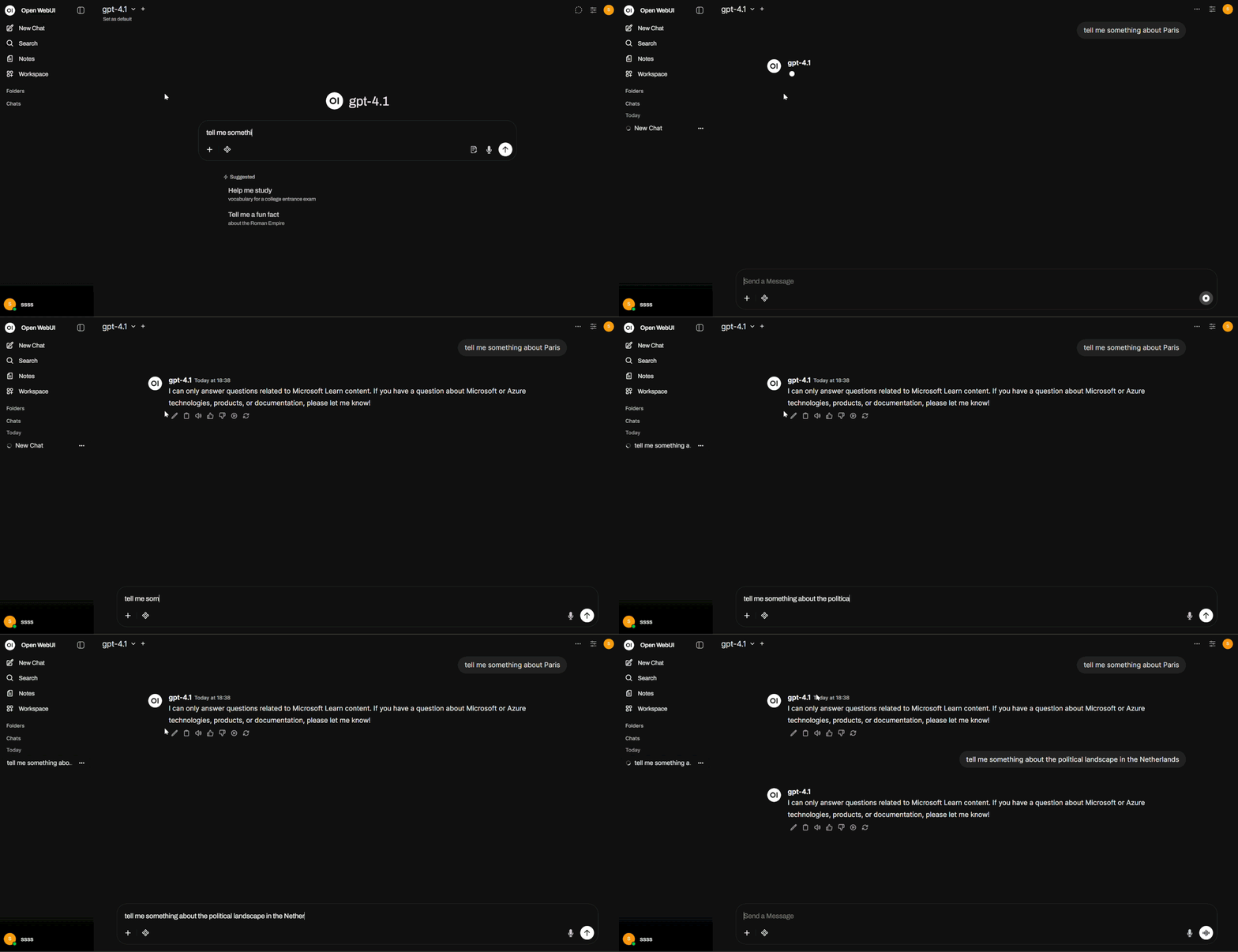
The system prompt ensures the agent stays focused on its domain. This makes it a reliable, purpose-built assistant rather than a general-purpose chatbot.
Getting started yourself
Want to try this out? Here’s how:
-
Clone the repository:
git clone https://github.com/arashjalalat/ai-agent-copilot-sdk.git cd ai-agent-copilot-sdk/open-webui -
Create your
.envfile:copy .env.example .envAdd your
GITHUB_TOKENto the.envfile. -
Start the stack:
docker compose up -d --build -
Open the UI: Navigate to http://localhost:3000, create an admin account, and start chatting with your Microsoft Learn-grounded agent.
What’s next?
This project can be extended in many directions:
- Add more MCP servers: connect Azure DevOps, GitHub, or your own custom MCP endpoints
- Multi-model support: expose multiple Copilot models as separate options in Open WebUI
- Authentication: add API key or OAuth authentication to the agent API
- Custom tools: build domain-specific tools that the agent can call during conversations
- Persistent sessions: store sessions in a database instead of in-memory for production use
Conclusion
The GitHub Copilot SDK makes it straightforward to build a specialized AI agent in C# (or Python). By combining it with the Microsoft Learn MCP endpoint, you get an agent that is grounded in official documentation and stays focused on its domain. Wrapping it in an OpenAI-compatible API means you can plug in any chat frontend, in this case Open WebUI, without any custom integration work.
This project is a great starting point for using AI agents with MCP. There is a lot to find out in this field, but as the MCP makes an AI agent so powerful, it raises also questions regarding security and compliance. For example, if you connect an agent to internal documentation via MCP, how do you ensure it doesn’t leak sensitive information? Or if the agent has write capabilities, how do you prevent it from making harmful changes? These are important considerations as you build and deploy AI agents in real-world scenarios.
Check out the complete source code: arashjalalat/ai-agent-copilot-sdk
Have questions or ideas for extending this agent? I would love to hear from you! Feel free to reach out or open an issue on the repository!